
I’ve been tinkering with the theme on this website, and I’m been very happy with how things have come out. I have a soft spot for gradients, especially with the ‘punk’ color scheme I’ve been using on my branding.
One question I get, consistently: “How can I achieve the rainbow gradient text effect”?
It’s actually really easy to do.
I have a helper class I’ve added to the CSS file in this child theme (a child theme of Ollie, by the way), with code similar to this:
.--is-rainbow{
    background: linear-gradient(135deg, var(--wp--preset--color--primary), var(--wp--preset--color--secondary));
    background-clip: text !important;
    -webkit-background-clip: text; /* For WebKit browsers */
    color: transparent;
    -webkit-text-fill-color: transparent; /* For older WebKit browsers */
}
This code does three things:
- Sets the gradient color as a linear gradient spanning the background of the element
- Uses
background-clipandwebkit-background-clipto tell the element to use the text as the borders for clipping - Uses
colorand-webkit-text-fill-colorto set the font color to a transparent value to allow the background to show through
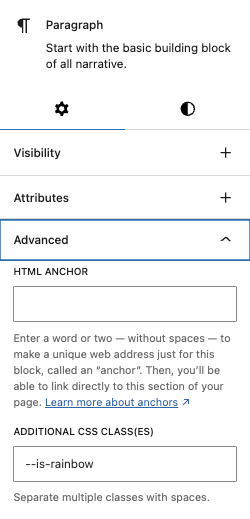
Once this code is in, it’s as easy as adding the class in the “Advanced” section of the editor sidebar.
And… voila! Rainbow text, usable on any text element in your WordPress block-based website.
Note: if you aren’t running a block-based theme, simply add the class --is-rainbow to your element in the HTML code and the rainbow will appear just the same!